B3TA
One price.
The AI isn’t billed separately
Agents that sell on WhatsApp, Messenger, Instagram and TikTok with your catalog’s real prices, a daily post on your social media, your store, your landing pages and your orders in Drop, for $297 a month. The only extra is what Meta charges for some WhatsApp messages, at cost.
Connects with
- TikTok
No free trial and no lock-in: cancel anytime before your next charge.
COD UnlimitedWhat you pay
- Plan, every month
- $297
- Setup, one time
- $297
- First charge
- $594
- AI
- Included
- Landing pages and funnels
- Included
- Daily social media post
- Included
- Ads manager
- Included
- Users
- Up to 25
- Contacts
- Unlimited
- Lock-in
- None
- Messages Meta charges
- At cost
Before you pay, we show you the system working on a real store.
What’s included
Open each part to see the details.
Seven agents, each with its own job.
They answer on WhatsApp, Messenger, Instagram and TikTok at any hour, with your catalog’s real prices. They understand voice notes, and on WhatsApp they also reply with a voice note. They answer in the language the customer writes in.
Laura · Catalog sales
Answers questions, finds the product even when it’s misspelled, gives the real price, takes the shipping details, checks the address and closes the order.
Laura · Single-product sales
The same, for a one-product campaign, with everything about that product.
Laura · Social media sales
Answers your Facebook, Instagram and TikTok messages with your catalog: replies, gives the real price, sends the photos or the product page and asks for a WhatsApp number to close the order.
Valeria · Logistics
Says where the order is and handles cancellations and warranties.
Product researcher
Writes each product’s sales sheet and the text for its landing page: what it is, what it’s for and what people ask. You review and approve it.
Lost-sale reasons
Reads the conversations that didn’t end in a purchase and tells you why, with the customer’s own words as proof.
Conversation auditor
Reviews the previous day’s conversations every day and tells you where the sale was lost: in the agent, the product sheet, the ad or the delivery.
When an agent doesn’t know something or the customer asks for a person, it hands the conversation to your team with a notice. If nobody on your team answers, it goes back to the agent.
What happens on its own, hands-off.
Sale and order
- A confirmed order creates the order in Drop on its own, with its receipt.
- If the customer asks for photos or video, it sends them.
- If a detail is missing after 24 hours, it writes with a message approved by Meta.
- You get an alert if a confirmed order didn’t make it to Drop.
Delivery
- It tells the customer every time the order changes status.
- When your team moves an order or a warranty case, the customer finds out.
Winning back sales
- It writes again during the first month to people who asked and didn’t buy.
- Abandoned carts from the store.
- “Message me at the end of the month”: it reminds them on that date.
- Repeat purchase 10 days after delivery.
- Anyone who says “no” or “don’t message me” gets no more offers.
On your social media
- It replies in public to Facebook, Instagram and TikTok comments with the real price, only when it’s clear which product they’re asking about. If there’s doubt, it replies without a price and invites them to a direct message, where the agent confirms.
- One post a day on each connected account: it opens with a real pain point of the buyer, then the product, its price and “pay on delivery”. It rotates your products and skips the sold-out ones. On Facebook the link is tagged so you know which post sold; on Instagram and TikTok it asks people to send a direct message.
- If a post doesn’t go out, it alerts you.
- Photos and video go as files on WhatsApp and Messenger. On Instagram, photos as files and the video as a link; on TikTok, as a link to the product page.
Warranties
- Each product has its own warranty, with its term and condition, and the agent explains it before selling.
- A claim opens a case with photos and creates the task for your person in charge. The replacement comes from the supplier or your store, as you set it up.
Your team
- One open task per person, with a reference number, so nothing gets duplicated.
- An alert if someone wrote and nobody answered in 10 minutes.
- Alerts about complaints, health topics, sold-out products, low stock and cost changes in Drop.
What it answers on each network.
What we tested in a real store, network by network.
| What it does | TikTok | |||
|---|---|---|---|---|
| Answers direct messages | Yes, with the real price | Yes, on Messenger | Yes, with the real price | Yes, with the real price |
| Voice notes | Understands them and also replies with a voice note | Understands them and replies in writing | No: only text comes through on TikTok | Understands them and replies in writing |
| Sends product photos and video | Yes, as files | Yes, as files | As a link to the product page | Photos as files; the video as a link to the page |
| Understands the photo they send | Yes, it recognizes the product | Yes, it recognizes the product | No: only text comes through on TikTok | Yes, it recognizes the product |
| Answers comments | Doesn’t apply | Yes, in public and by private message | Yes, in public | Yes, in public and by private message |
In comments it only gives the price when it’s clear which product they’re asking about. TikTok doesn’t allow sending files from the platform or privately messaging someone who only commented. Instagram doesn’t allow sending videos by direct message: they go as a link to the page.
Your store, your landing pages and your dashboard.
- Online store with your brand: your logo, colors and fonts, with the Drop products you choose to publish, their prices and bundles, and a search that understands how people type.
- Landing pages included, no charge per page: you build them yourself from the Landings menu. Pick a product and the researcher writes its cash-on-delivery landing page in about a minute, with the order form connected; you review and approve it. It uses only real product photos.
- Your whole funnel: from the ad to the landing page or WhatsApp, from the order to Drop, from delivery to repeat purchase, with a board that shows what stage each person is in.
- A three-part dashboard: Products (what comes from Drop and what you publish), Orders (each order and its status) and Reports (sales, funnel, why people didn’t buy, customer type and Excel export).
- Ads manager: you create your Facebook, Instagram and Google ads and see how much you’ve spent and how each one is doing, from the same panel. What you pay Meta or Google for the ads is still yours.
- A daily check of your site for Google: if a page drifts from what the search engine asks for, we let you know.
No Drop account yet? Create your Drop account (opens the Drop site).
Drop is a trademark of its owners. B3TA is a separate service that connects to your Drop account.
From Drop to your customer, step by step.
This is how it runs, from the moment you open your Drop account until your customer gets the order.
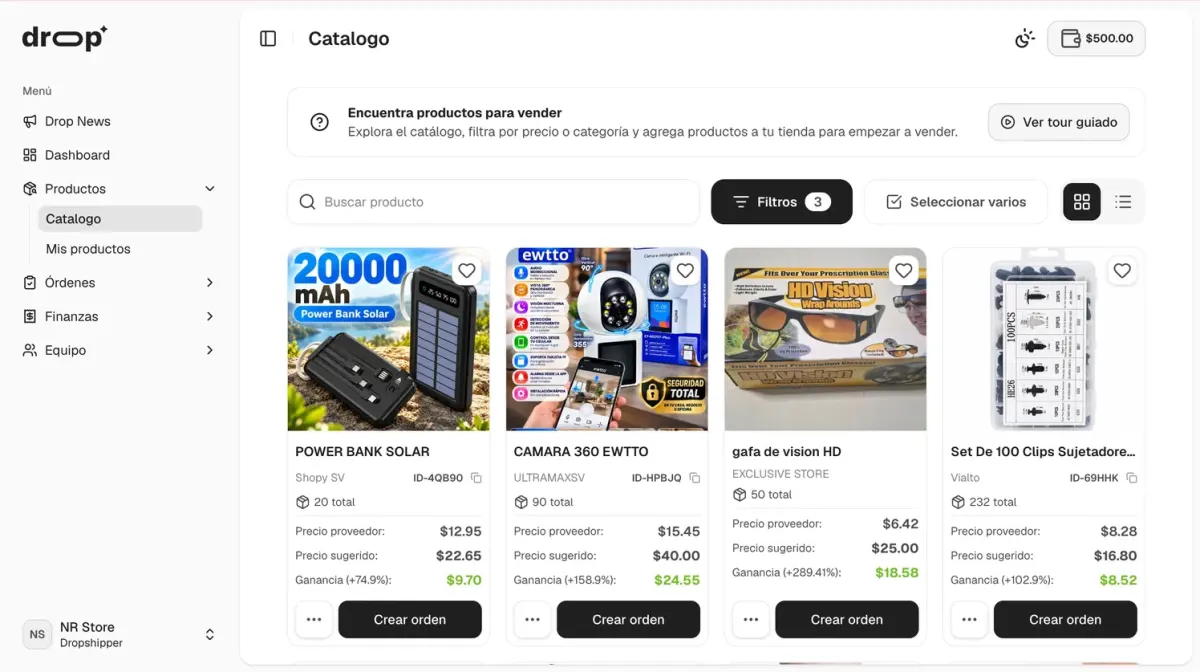
- You sign up with Drop.Create your Drop account, pick your country and set up your Drop store.
- You pick your products.From Drop’s catalog you add the products you want to sell to your store. You see the supplier price, the suggested price and your profit.
- Your money sits in your Drop wallet.Drop pays out the next business day and you move the money to your account.
- Your products show up in your account on their own.Our platform syncs them with their price and lets you know about stockouts, low stock and cost changes.
- You set up where you sell.A landing page for each product, your online store, or just WhatsApp.
- You run your ads and your agents sell.An agent that specializes in the product answers with its details, takes the order and the customer’s information, and checks the address.
- The order reaches Drop without you copying it.Drop creates the shipping label and sends it with its carriers.
- Your customer knows where the order is.The agents let them know about every status change until it arrives. And they write again to people who didn’t buy.
How your WhatsApp gets connected.
It’s connected inside your account with Meta’s official sign-in. Nobody asks for your password. There are three ways:
You keep your WhatsApp Business app
Coexistence: your same number works in the app on your phone and in the platform at the same time, and your agents answer from the platform. Your contacts and up to 6 months of chats come over. It suits you if you already sell on that number and it has customers.
A new number just for the platform
A number that isn’t on WhatsApp. It’s confirmed with a code by text or call and from then on it lives only in the platform: your agents and your team handle it, not the WhatsApp app on a phone.
If you already have it with another provider
It moves to the platform without changing the number.
If you choose coexistence, this changes
- The number must already be in use on the WhatsApp Business app with real customers. Meta won’t accept a new or unused number.
- You open the app on your phone at least once every 14 days; otherwise it disconnects.
- In one-on-one chats, disappearing messages, view once and live location are turned off.
- Broadcast lists become read-only and groups don’t move to the platform.
- Templates (order notices and win-back messages) are sent from the platform, not from the app.
- One number per account with coexistence.
Your WhatsApp Business account is yours
It’s the WhatsApp Business account that lives inside your business portfolio at Meta. Your number, your display name and your approved templates live there, and it’s yours. To create it you need a Facebook account; if your business has no portfolio at Meta, it’s created in the same step. Meta may ask you to verify your business to raise your sending limits.
How you get started
- You see it working.A 30-minute video demo on a real store, with its conversations and orders.
- You pay the plan and the setup.$297 for the first month and $297 for setup, one time.
- We set up yours.Your store with your brand, the landing page for your first product, the connection with Drop and your WhatsApp, your agent with your catalog and every automation turned on.
- 10:04 p. m.
- Customer: Hi, I saw the ad. Is it still available?
- Agent: Hi, yes it is. Which area would the delivery be to?
- Customer: Mixco, zone 4.
- Agent: We deliver there and you pay when it arrives. What name should I put on the order?
- Customer: Karla.
- Agent: Done, Karla. Your order is in and we’ll confirm delivery tomorrow.
- Order taken · 10:06 p. m.
How far unlimited goes
| What | Limit |
|---|---|
| Your agents’ conversations | Unlimited, with fair use: if usage were excessive, far from what’s normal for a store, the platform provider may limit it. For reference, a store with active ads received about 1,400 WhatsApp messages in two weeks with no AI cost. |
| Researcher’s product sheets and landing pages | Up to 300 a month. |
| Lost-sale reasons | Up to 60 reviews a month. Each one reads several conversations. |
| Conversation auditor | Up to 60 reviews a month. One a day covers the month. |
| Automatic posts | One a day per connected account. It can be adjusted, or left as drafts so you review them first. |
| Messages Meta charges | You pay them on top, at cost. |
What isn’t included today
- Your website chat isn’t handled by an agent yet.
- On TikTok the agent can’t send photos or videos as files (they go as a link to the page) or privately message someone who only commented: those are TikTok’s rules.
- The agent doesn’t answer phone calls. Answering the phone is the Voice Agent, sold separately. Calls and texts you make are billed by usage.
- Your Drop account, your ads and your domain are still yours and you pay for them.
Questions
Is the AI really not extra?
Yes. Your agents’ conversations are part of the plan. The only thing you pay on top is what Meta charges for some WhatsApp messages, and conversations that start from your ad or that the customer starts aren’t charged.
How is this different from a WhatsApp chatbot?
In the WhatsApp sales tools we reviewed (their pricing pages, November 2026), the AI is billed separately or comes as credits that run out. And they don’t handle the cash-on-delivery order: they don’t create the order in Drop, track the delivery or win back people who didn’t buy. Here that’s included.
Why is there no free trial?
Because every store starts with its agents and unlimited AI from day one. Instead of a trial, before you pay we show you the system working on a real store, with its conversations and orders.
Can I cancel anytime?
Yes. There’s no lock-in: cancel before your next charge and you won’t be charged again.
How many users are included?
Up to 25. Each person on your team signs in with their own user and only sees what they need: sales, logistics or accounting. Contacts are unlimited.
How soon do I start selling?
Your account is created on its own seconds after you pay. The rest depends on your case: what usually takes longest is Meta approving your WhatsApp number, and that doesn’t depend on us. In the demo we look at your case and tell you what’s missing.
Can I keep using WhatsApp Business on my phone?
Yes, with coexistence: the same number works on your phone and in the platform. What changes with that option is listed above; the main thing is opening the app at least every 14 days and that the number already has customers.
Who helps me if something breaks?
Our team, on WhatsApp, Monday to Friday from 8:00 a.m. to 6:00 p.m., Guatemala time.
What do I need?
Your Drop account, a WhatsApp number for your business and your domain. You or your agency run the ads. If you don’t have a Drop account yet, you create it at app.soydrop.com with the link on this page.
Can it post a wrong price in a comment?
It’s built not to. It only posts a price in public when it’s clear which product they’re asking about; if there’s doubt, it replies without a price and invites them to a direct message, where the agent confirms the product.
Is there a money-back guarantee?
No. That’s why this page says everything that’s included and everything that isn’t, and why we show you the system working before you pay. What’s written here is what you get.
See it working before you pay
In a 30-minute video call we show you the system on a real store, with its conversations and orders.